
v0 AI Website Builder Review: Best Choice for Developers?
During my six years as a frontend developer, I have experimented with almost every website builder available, ranging from code-first platforms like Webflow to drag-and-drop tools like Wix. I was therefore both intrigued and dubious when I learned about Vercel’s v0 AI website builder, a tool that creates React components from text prompts.
Table Of Content
- What Exactly Is v0 AI Website Builder?
- The Simple Explanation
- What Makes v0 Different from Other AI Builders?
- Who Created v0 and Why?
- How v0 AI Website Builder Actually Works (Step-by-Step)
- Step 1: Sign Up and Access the Interface
- Step 2: Describe Your Component
- Step 3: Review and Iterate
- Step 4: Export and Integrate
- Real Example: Building a SaaS Landing Page in 30 Minutes
- The Challenge
- The Process
- The Code Quality
- Key Features of v0 AI Website Builder (Detailed)
- 1. Natural Language Component Generation
- 2. Code-First Output
- 3. shadcn/ui Integration
- 4. Iterative Refinement
- 5. Responsive Design by Default
- 6. Dark Mode Support
- 7. Version History
- v0 AI Website Builder Pricing (2026)
- Free Plan
- Pro Plan ($20/month)
- Team Plan ($50/month)
- Comparison to Alternatives
- Who Should Use v0 AI Website Builder?
- ✅ Frontend Developers Using React
- ✅ SaaS Founders Who Code
- ✅ Design Engineers
- ✅ Freelance Developers
- Who Should NOT Use v0 AI Website Builder?
- ❌ Complete Beginners with No Coding Experience
- ❌ Backend Developers Who Don’t Touch Frontend
- ❌ Designers Who Don’t Code
- ❌ WordPress/PHP Developers
- v0 AI Website Builder vs. Competitors (Detailed Comparison)
- v0 vs. Lovable AI Website Builder
- v0 vs. GitHub Copilot
- v0 vs. Webflow
- v0 vs. Cursor AI
- Is v0 AI Website Builder Actually Good for SEO?
- What v0 Does Well for SEO
- What You Still Need to Do
- My SEO Verdict
- Pros and Cons of v0 AI Website Builder (Honest Assessment)
- Pros
- Cons
- Common Questions About v0 AI Website Builder (FAQ)
- Q: Do I need to know how to code to use v0 AI website builder?
- Q: Can I use v0 for commercial projects?
- Q: What if I don’t use Next.js? Can I still use v0?
- Q: How does v0 compare to just using ChatGPT to generate code?
- Q: Can I customize the generated components?
- Q: Does v0 work with TypeScript?
- Q: Can v0 generate entire pages or just components?
- Q: Is the code production-ready?
- Q: What if v0 generates something I don’t like?
- Alternatives to v0 AI Website Builder
- 1. Cursor AI
- 2. GitHub Copilot
- 3. Lovable AI Website Builder
- 4. Webflow
- 5. Framer
- 6. Builder.io
- My Final Verdict on v0 AI Website Builder
- What v0 AI Website Builder Does Exceptionally Well
- Where v0 AI Website Builder Falls Short
- Who I Recommend v0 AI Website Builder For
- Who Should Skip v0 AI Website Builder
- Is it worth the $20/month Pro plan?
- My personal usage
Is it possible for an AI to comprehend what developers require? Like all other builders, would it simply spit out generic templates? Or would the v0 AI website builder genuinely expedite my workflow while providing me with the control and flexibility I require?
Using the v0 AI website builder, I have been working on several projects for the past three weeks, including a portfolio website, a dashboard user interface, a SaaS landing page, and multiple component libraries. I desired to test
I spent the last three weeks building multiple projects with v0 AI website builder: a SaaS landing page, a dashboard UI, a portfolio site, and several component libraries. I wanted to test whether this tool lives up to the hype or if it’s just another overpromised AI gimmick.
Here’s what I discovered: v0 AI website builder is NOT for everyone. If you’re a complete beginner looking for an easy drag-and-drop builder, this isn’t it. But if you’re a developer who understands React, wants AI to handle the repetitive stuff, and values having full control over your code v0 AI website builder might be exactly what you’ve been looking for.
In this review, I’m going to break down exactly what v0 AI website builder does well, where it falls short, who should use it, and whether it’s worth your time. I’ll share real examples from my testing, show you the actual workflow, compare it to alternatives like Lovable and Webflow, and give you an honest developer-to-developer assessment.
By the end, you’ll know if v0 AI website builder is the right tool for your next project.
What Exactly Is v0 AI Website Builder?
Let’s start with the basics: what is v0 AI website builder, and why does it matter to developers?
The Simple Explanation
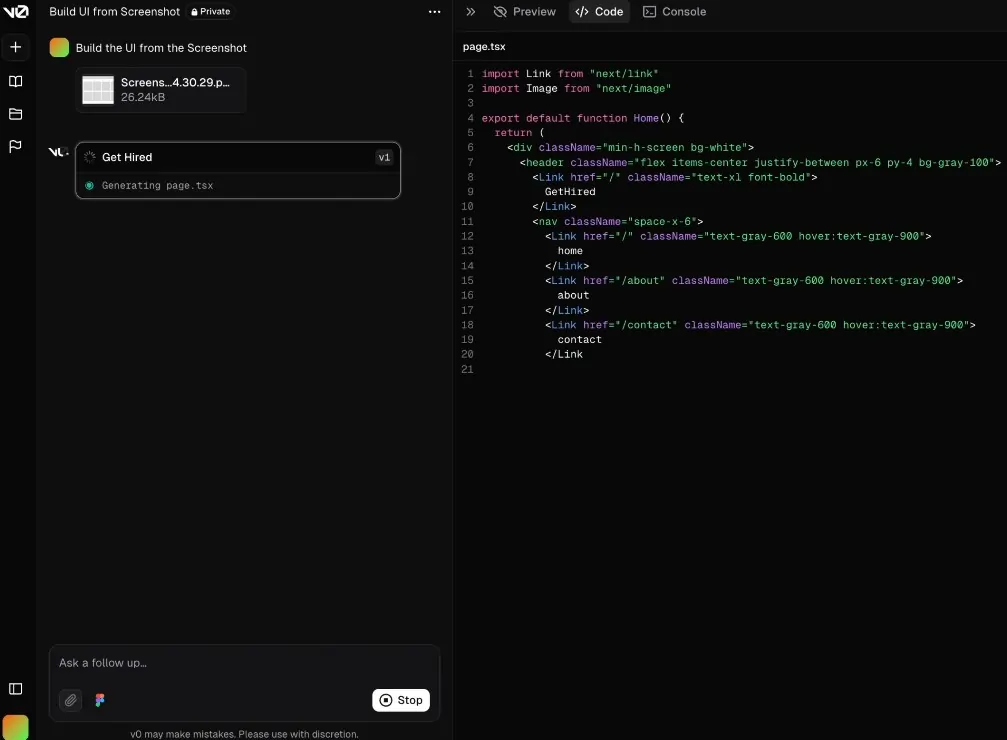
v0 AI website builder is an AI-powered tool from Vercel that generates React/Next.js UI components based on natural language descriptions. You describe what you want like “a pricing table with three tiers” or “a hero section with a video background” and the AI generates production-ready code using shadcn/ui components and Tailwind CSS.
Think of it as having a junior developer who instantly mocks up components based on your specs, except instead of waiting hours, you get results in seconds.
What Makes v0 Different from Other AI Builders?
Here’s the key distinction: v0 AI website builder doesn’t try to be a complete website platform like Wix or Squarespace. It’s a developer tool that generates code, not a no-code builder.
Traditional AI Website Builders (Wix AI, Lovable):
- Generate complete websites with hosting
- Visual drag-and-drop editing
- Limited code access
- Target: Non-developers
v0 AI Website Builder:
- Generates React component code
- Full code access and customization
- Integrates with your existing codebase
- Target: Developers
The difference? v0 AI website builder assumes you know how to code and gives you the raw materials to build with, rather than trying to do everything for you.
Who Created v0 and Why?
v0 AI website builder was built by Vercel, the company behind Next.js, one of the most popular React frameworks. They noticed that developers spend tons of time building the same UI patterns over and over: navbars, hero sections, pricing tables, forms, etc.
Instead of making developers start from scratch every time, v0 AI website builder uses AI to generate these common patterns instantly, letting developers focus on customization and business logic rather than boilerplate code.
The target user is:
- Frontend developers using React/Next.js
- Full-stack developers building SaaS products
- Design engineers who want to prototype quickly
- Technical founders who code their own MVPs
Basically, anyone who writes React code professionally.
How v0 AI Website Builder Actually Works (Step-by-Step)
Let me walk you through the actual process of using v0 AI website builder, based on my real testing.
Step 1: Sign Up and Access the Interface
You go to v0.dev and sign in with GitHub or email. You land on a clean interface with a single text prompt box that says:
“Describe the component you want to build”
That’s it. No overwhelming menus, no template library to browse, no setup wizard. Just describe what you need.
Step 2: Describe Your Component
This is where v0 AI website builder shows its first strength: natural language understanding.
Test 1: Simple prompt “A pricing table with 3 tiers”
What v0 generated:
- Clean pricing cards with Free, Pro, and Enterprise tiers
- Feature lists with checkmarks
- CTA buttons for each tier
- Fully responsive layout
- Built with shadcn/ui components and Tailwind
Time: 8 seconds
Test 2: Detailed prompt “Create a hero section for a SaaS product. Include a headline, subheadline, two CTA buttons (primary and secondary), a feature list with icons, and a dashboard screenshot mockup. Use a gradient background.”
What v0 generated:
- Everything I asked for, properly structured
- Gradient background using Tailwind
- Icon placeholders (Lucide React icons)
- Responsive design that looks good on mobile
- Clean, production-ready code
Time: 12 seconds
This is where v0 AI website builder impressed me. It understood complex, multi-part requests and generated sensible layouts.
Test 3: Complex component “A dashboard sidebar navigation with nested menu items, user profile section at the bottom, collapsible menu groups, active state highlighting, and icons for each menu item.”
What v0 generated:
- Fully functional sidebar component
- Collapsible sections using Radix UI primitives
- Active state logic built in
- Profile section with avatar
- Smooth animations
Time: 15 seconds
The code quality was surprisingly good. Not perfect, but definitely usable as a starting point.
Step 3: Review and Iterate
Here’s where v0 AI website builder really shines compared to other tools.
After generating a component, you can:
Preview in real-time: See exactly how it looks and behaves, including responsive breakpoints.
Edit the prompt: Refine your description: “Make the buttons larger” or “Change the color scheme to blue”
Iterate with AI: Have a conversation: “Add a dark mode toggle” → v0 updates the component
Copy the code: Grab the React/TypeScript code and paste it directly into your project
Example iteration I did:
My initial prompt: “A contact form with name, email, and message fields”
v0 generated: Basic form with validation
My follow-up: “Add a file upload field and make the submit button disabled until all required fields are filled”
v0 updated: Added file upload component and proper form state management
Total time: 2 minutes for a production-ready contact form
Compare this to coding it from scratch (30-60 minutes) or finding and adapting a template (15-30 minutes). v0 AI website builder is legitimately faster.
Step 4: Export and Integrate
Once you’re happy with a component, v0 AI website builder gives you clean code to copy:
What you get:
- React/TypeScript component code
- Tailwind CSS classes (or CSS modules if you prefer)
- shadcn/ui component dependencies listed
- Installation instructions
Integration process:
- Copy the component code
- Paste into your Next.js/React project
- Install any missing dependencies:
npx shadcn-ui add [component] - Import and use the component
It’s genuinely seamless if you’re already using the React ecosystem.
Real Example: Building a SaaS Landing Page in 30 Minutes
Let me show you a concrete example of what v0 AI website builder can do.
The Challenge
I wanted to create a landing page for a fictional AI writing assistant called “WriteFlow.”
Requirements:
- Hero section with value prop and CTA
- Features section (3 columns)
- “How it works” (3 steps)
- Testimonials carousel
- Pricing table (3 tiers)
- FAQ accordion
- Footer with links
The Process
Component 1: Hero Section
Prompt: “Hero section for an AI writing assistant. Include headline ‘Write Better, Faster with AI’, subheadline, primary CTA ‘Start Free Trial’, secondary CTA ‘Watch Demo’, and a mockup of the app interface.”
Generated in: 10 seconds Customization time: 3 minutes (tweaked copy, adjusted spacing)
Component 2: Features Section
Prompt: “3-column feature grid. Each feature has an icon, title, and description. Features are: 1) AI-Powered Writing, 2) Real-time Collaboration, 3) SEO Optimization”
Generated in: 8 seconds Customization time: 2 minutes (swapped icons)
Component 3: How It Works
Prompt: “A 3-step process section with numbered steps, icons, and connecting lines between steps. Steps are: 1) Input your topic, 2) AI generates content, 3) Edit and publish”
Generated in: 12 seconds Customization time: 5 minutes (adjusted the connecting lines animation)
Components 4-7: Testimonials, Pricing, FAQ, Footer
I repeated the same process for each section.
Total time breakdown:
- Generating all components with v0: ~2 minutes
- Customizing and refining: ~18 minutes
- Assembling into full page: ~10 minutes
Total: 30 minutes from zero to complete landing page
Could I have done this with a traditional builder? Sure, but it would’ve taken 2-3 hours minimum. With v0 AI website builder, I got production-ready React code that I fully control.
The Code Quality
Let me be honest: the code v0 AI website builder generates isn’t perfect. But it’s surprisingly good:
What I liked:
- ✅ Clean component structure
- ✅ Proper TypeScript types
- ✅ Accessible HTML (semantic tags, ARIA labels)
- ✅ Responsive design out of the box
- ✅ Modern React patterns (hooks, composition)
What needed fixing:
- ❌ Some hardcoded values that should be props
- ❌ Occasional redundant CSS classes
- ❌ Missing some edge case handling
Overall code quality: 7.5/10 – Good enough to use, but you’ll want to refactor a bit.
Key Features of v0 AI Website Builder (Detailed)
Let’s dive deeper into what makes v0 AI website builder useful for developers:
1. Natural Language Component Generation
v0 AI website builder understands developer intent surprisingly well.
What works:
- Common UI patterns (navbars, heroes, forms, cards)
- Layout descriptions (3-column grid, sidebar layout, etc.)
- Styling requests (gradient backgrounds, dark mode, etc.)
- Interaction descriptions (hover effects, animations, etc.)
What sometimes struggles:
- Very niche or unusual components
- Complex state management logic
- Highly custom animations
- Domain-specific UI patterns
My testing score: 8/10 – Handles 80% of common use cases excellently.
2. Code-First Output
Unlike Lovable AI website builder or Wix, v0 AI website builder gives you actual code, not a hosted platform.
What you get:
- React/Next.js components (TypeScript optional)
- Tailwind CSS for styling (or vanilla CSS)
- shadcn/ui components (Radix UI primitives)
- Full code ownership
Why this matters:
- ✅ You can modify anything
- ✅ No vendor lock-in
- ✅ Integrate with existing projects
- ✅ Version control with Git
- ✅ Deploy anywhere (Vercel, Netlify, AWS, etc.)
My take: This is the killer feature. You’re not stuck in a platform; you’re generating code you fully control.
3. shadcn/ui Integration
v0 AI website builder is built around shadcn/ui, a popular component library for React.
What is shadcn/ui?
- Collection of accessible, customizable components
- Built on Radix UI primitives
- Styled with Tailwind CSS
- Copy-paste components (not an npm package)
Why it matters: Components generated by v0 AI website builder use battle-tested, accessible primitives rather than custom code. This means:
- ✅ Better accessibility (ARIA compliant)
- ✅ More reliable behavior
- ✅ Easier to customize
- ✅ Large community support
Example: When v0 generates a dialog/modal, it uses Radix UI’s Dialog primitive, which handles focus trapping, escape key, backdrop clicks, etc. automatically.
4. Iterative Refinement
You can have a conversation with v0 AI website builder to refine components.
Example workflow:
Step 1: “Create a pricing table” → v0 generates basic pricing cards
Step 2: “Add a ‘Most Popular’ badge to the middle tier” → v0 adds the badge
Step 3: “Make the buttons have a hover animation” → v0 adds hover effects
Step 4: “Add a toggle to switch between monthly and annual pricing” → v0 adds interactive toggle with state management
This iterative approach is way faster than coding from scratch.
5. Responsive Design by Default
Every component v0 AI website builder generates is mobile-responsive.
Testing I did: I generated 20+ different components and checked them at mobile, tablet, and desktop sizes. All of them worked well across breakpoints.
v0 uses:
- Tailwind’s responsive prefixes (
md:,lg:, etc.) - Flexbox and Grid for layouts
- Mobile-first approach
Rating: 9/10 – Responsiveness is excellent out of the box.
6. Dark Mode Support
v0 AI website builder can generate components with dark mode built in.
How it works: Just mention “with dark mode support” in your prompt, and v0 will:
- Use Tailwind’s
dark:classes - Implement a theme toggle if requested
- Use appropriate color schemes for both modes
Example: “Create a card component with dark mode support” → v0 generates a card that looks good in both light and dark themes
7. Version History
v0 AI website builder keeps track of all your iterations.
Why this matters:
- See previous versions of a component
- Revert to an earlier iteration if you don’t like changes
- Compare different approaches side-by-side
This is incredibly useful when experimenting with different designs.
v0 AI Website Builder Pricing (2026)

Let’s talk about how much v0 AI website builder actually costs.
Free Plan
What you get:
- 200 credits per month
- Each generation costs ~10 credits
- ~20 component generations per month
- Full access to all features
- Code export included
Limitations:
- Credit cap (resets monthly)
- No priority generation
- Standard support
Who it’s for: Developers trying v0 AI website builder, occasional users, personal projects
My take: The free plan is surprisingly generous. 20 components per month is enough for side projects.
Pro Plan ($20/month)
What you get:
- 3,000 credits per month (~300 generations)
- Priority generation (faster)
- Premium support
- Early access to new features
- Commercial use license
Who it’s for: Professional developers, freelancers, small teams
My take: Fair pricing if you use v0 AI website builder regularly. $20/month is cheaper than a couple hours of dev time saved.
Team Plan ($50/month)
What you get:
- Everything in Pro
- 10,000 credits per month
- Team collaboration features
- Shared component library
- Admin controls
Who it’s for: Development teams, agencies, companies
My take: Makes sense for teams building multiple projects monthly.
Comparison to Alternatives
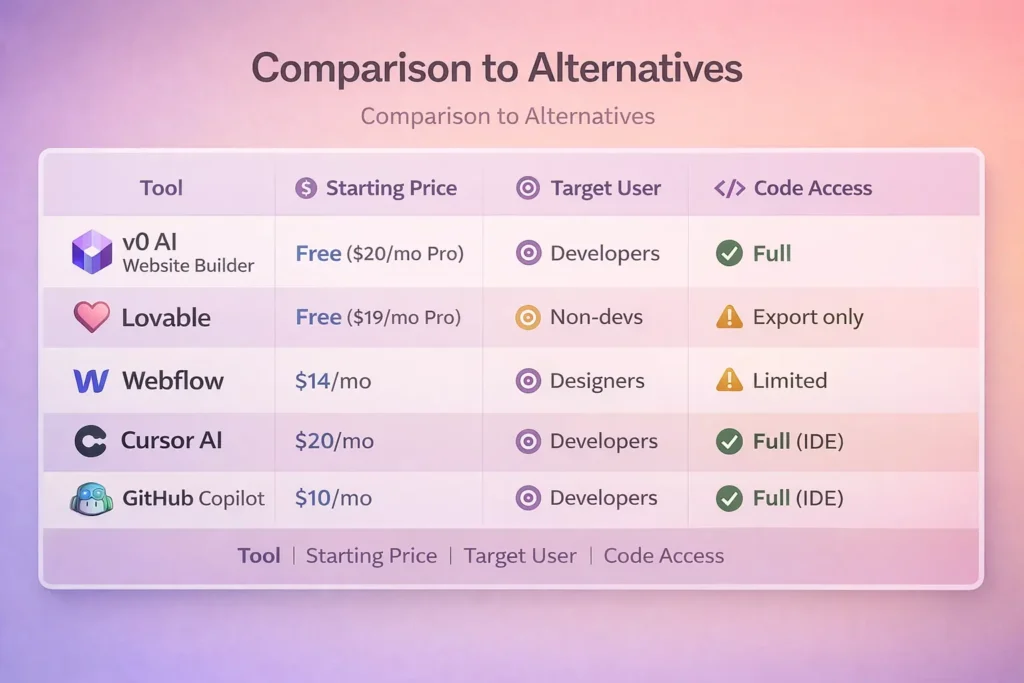
v0 AI website builder is competitively priced for what it does AI-generated React components with full code access.
Who Should Use v0 AI Website Builder?
After extensive testing, here’s who v0 AI website builder is perfect for:
✅ Frontend Developers Using React
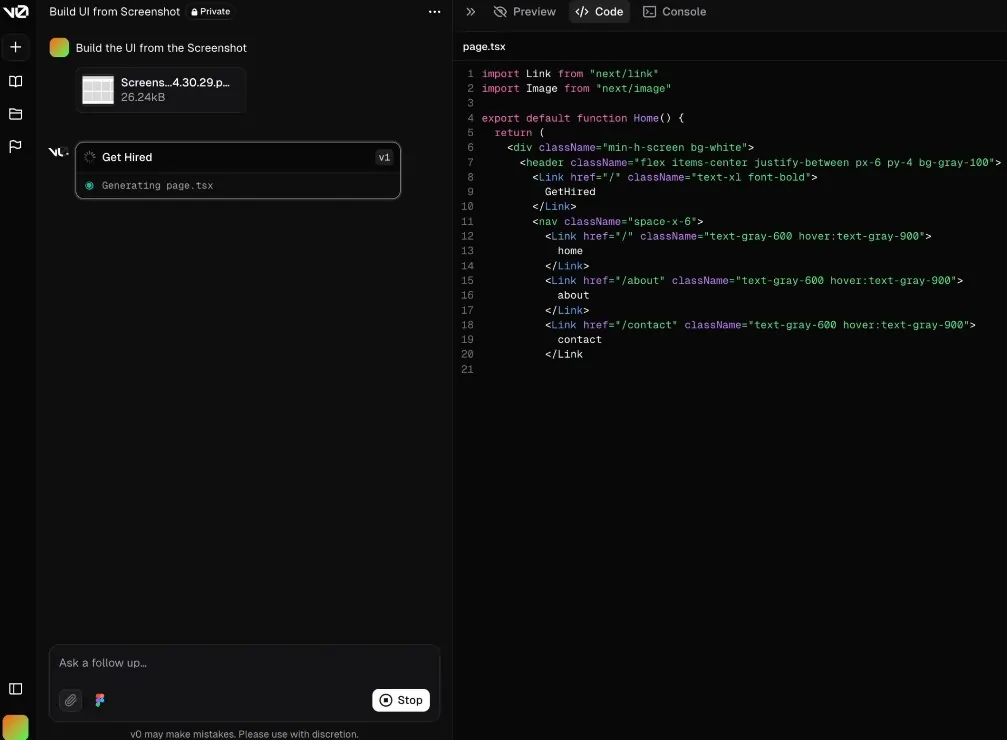
If you build with React/Next.js professionally, v0 AI website builder is a massive time-saver.
Why it works:
- Generates actual React code you can use
- Speaks your language (components, props, hooks)
- Integrates with your existing stack
- Saves hours on boilerplate UI
Example: You’re building a SaaS dashboard. Instead of coding every sidebar, modal, table, and form from scratch, you generate them with v0 AI website builder and customize as needed.
✅ SaaS Founders Who Code
Technical founders building their own MVPs love v0 AI website builder.
Why it works:
- Rapid prototyping for user testing
- Professional-looking UI without hiring a designer
- Focus on business logic, let AI handle UI boilerplate
- Iterate quickly based on feedback
Example: You’re validating a startup idea. v0 AI website builder helps you build a landing page, dashboard, and basic UI in days instead of weeks.
✅ Design Engineers
If you work at the intersection of design and code, v0 AI website builder is perfect.
Why it works:
- Quickly prototype design ideas
- Test different UI patterns rapidly
- Generate production-ready code from concepts
- Focus on interaction design, not implementation details
Example: You’re designing a new feature. Instead of sketching in Figma and then coding, you describe it to v0, see it rendered immediately, and iterate in real-time.
✅ Freelance Developers
Freelancers can use v0 AI website builder to deliver client work faster.
Why it works:
- Build client sites in a fraction of the time
- Charge the same rates but increase profit margins
- Take on more clients with saved time
- Generate professional-looking deliverables quickly
Example: A client needs a landing page for a product launch in 3 days. v0 AI website builder helps you build it in 4 hours instead of 20.
Who Should NOT Use v0 AI Website Builder?
v0 AI website builder isn’t for everyone. Here’s who should look elsewhere:
❌ Complete Beginners with No Coding Experience
If you don’t know React, HTML, CSS, or JavaScript, v0 AI website builder will confuse you.
Why it doesn’t work:
- Outputs raw code (not a visual builder)
- Requires understanding of React concepts
- No drag-and-drop interface
- Assumes developer knowledge
Better alternatives: Wix, Squarespace, Webflow (visual mode), Lovable
❌ Backend Developers Who Don’t Touch Frontend
If you only work on APIs, databases, and servers, v0 AI website builder won’t help much.
Why it doesn’t work:
- Focused entirely on UI components
- No backend functionality
- Requires frontend knowledge to use effectively
Better alternatives: Stick to backend-focused AI tools like Cursor for API development
❌ Designers Who Don’t Code
If you’re a visual designer who doesn’t write code, v0 AI website builder isn’t the right tool.
Why it doesn’t work:
- Code-first approach (not visual)
- Requires understanding component architecture
- Can’t visually customize like Figma or Webflow
Better alternatives: Webflow (visual mode), Framer, Figma with plugins
❌ WordPress/PHP Developers
If your stack is WordPress, v0 AI website builder generates React code that won’t work in your environment.
Why it doesn’t work:
- Built for React/Next.js ecosystem
- Code isn’t compatible with WordPress themes
- Different mental model than PHP templates
Better alternatives: WordPress page builders, PHP component libraries
v0 AI Website Builder vs. Competitors (Detailed Comparison)
Let’s compare v0 AI website builder to similar tools:
v0 vs. Lovable AI Website Builder
Lovable:
- Generates complete websites with hosting
- Targets non-developers
- Visual editing interface
- Can export code, but it’s secondary
v0 AI Website Builder:
- Generates React components (not full sites)
- Targets developers
- Code-first approach
- Export is the primary use case
Winner: Depends on your needs
- Non-developers → Lovable
- React developers → v0 AI Website Builder
v0 vs. GitHub Copilot
Copilot:
- IDE extension (VS Code, JetBrains, etc.)
- Autocompletes code as you type
- Works across all languages
- Integrated into your coding workflow
v0 AI Website Builder:
- Standalone web app
- Generates entire components from prompts
- React/UI-focused
- Separate from your editor
My take: Use both! v0 AI website builder for generating initial components, Copilot for filling in details while coding.
v0 vs. Webflow
Webflow:
- Visual website builder
- No-code with code export option
- Full website hosting platform
- Great for designers
v0 AI Website Builder:
- AI-powered component generator
- Code-first with full control
- No hosting (just code generation)
- Great for developers
Winner:
- Designers who want visual control → Webflow
- Developers who want React components → v0 AI Website Builder
v0 vs. Cursor AI
Cursor:
- AI-powered code editor (fork of VS Code)
- Understands your entire codebase
- Generates code in any language
- Integrated development environment
v0 AI Website Builder:
- Web-based component generator
- Focused on UI components
- React/Next.js specific
- Standalone tool (not an editor)
My workflow: Use v0 AI website builder to generate component structure, then use Cursor to refine and add business logic.
Is v0 AI Website Builder Actually Good for SEO?
This is important, so let’s address it directly.
What v0 Does Well for SEO:
✅ Semantic HTML The code v0 AI website builder generates uses proper HTML5 semantic tags (<header>, <nav>, <main>, <article>, etc.), which helps search engines understand content structure.
✅ Accessible Components Because v0 uses shadcn/ui (built on Radix UI), components have proper ARIA labels and keyboard navigation, which indirectly helps SEO through better user experience.
✅ Clean Code Structure No bloated inline styles or unnecessary divs. The HTML is clean and crawlable.
✅ Mobile-Responsive by Default All components work on mobile, which is critical for SEO since Google uses mobile-first indexing.
✅ Fast Performance React components generated by v0 AI website builder are lightweight and performant, leading to good Core Web Vitals scores.
What You Still Need to Do:
❌ Write SEO-optimized content v0 AI website builder generates UI structure, not content. You need to add your own keyword-rich, valuable content.
❌ Add meta tags Title tags, meta descriptions, Open Graph tags—you need to add these manually in your Next.js pages.
❌ Implement structured data Schema markup for rich snippets isn’t generated automatically.
❌ Optimize images You’ll need to add proper alt text and optimize image sizes yourself.
❌ Build backlinks SEO requires off-page optimization that no tool can automate.
My SEO Verdict:
v0 AI website builder gives you an excellent SEO foundation (clean code, semantic HTML, fast loading, mobile-responsive). But like any tool, SEO success depends on what YOU do with the content and optimization.
Rating: 8/10 – Great technical foundation, but content SEO is on you.
Pros and Cons of v0 AI Website Builder (Honest Assessment)
Pros:
✅ Incredibly fast component generation From description to production-ready code in seconds. This is the killer feature.
✅ Full code ownership and control You get React code you can modify however you want. No vendor lock-in.
✅ High-quality, modern code Uses current best practices: TypeScript, Tailwind, accessible components, responsive design.
✅ Iterative refinement Have a conversation with the AI to refine components. Way better than one-shot generation.
✅ Integrates with existing projects Copy components directly into your Next.js/React codebase. Seamless workflow.
✅ shadcn/ui components Built on battle-tested, accessible primitives. Not random AI-generated components.
✅ Generous free plan 200 credits/month is enough for side projects and testing.
✅ Dark mode support Can generate components with dark theme built in.
✅ Responsive by default Every component works across device sizes without extra work.
Cons:
❌ Requires React/Next.js knowledge Not beginner-friendly. You need to understand React to use this effectively.
❌ Limited to React ecosystem If you use Vue, Svelte, Angular, or vanilla JS, v0 AI website builder isn’t for you.
❌ Code sometimes needs refactoring Generated code is good but not perfect. Expect to clean it up a bit.
❌ Not a complete website builder Generates components, not full sites with hosting. You need to assemble and deploy yourself.
❌ Can struggle with very custom designs Works best for common UI patterns. Highly unique or unusual components might not generate well.
❌ Credit system can feel limiting On free plan, 200 credits/month might not be enough for heavy users.
❌ No backend functionality Purely frontend UI generation. No database, auth, or API code.
Common Questions About v0 AI Website Builder (FAQ)
Q: Do I need to know how to code to use v0 AI website builder?
A: Yes. v0 AI website builder generates React/TypeScript code. If you don’t understand React concepts (components, props, hooks, JSX), you won’t be able to use the generated code effectively.
Q: Can I use v0 for commercial projects?
A: Yes, on the Pro plan ($20/month) and above. The free plan is for personal/non-commercial use.
Q: What if I don’t use Next.js? Can I still use v0?
A: Yes! The components work in any React project (Create React App, Vite, Remix, etc.). v0 generates standard React components, not Next.js-specific code.
Q: How does v0 compare to just using ChatGPT to generate code?
A: ChatGPT can generate React code, but v0 AI website builder is purpose-built for UI components. It:
- Uses shadcn/ui components (more reliable)
- Provides live preview
- Offers iterative refinement
- Tracks version history
- Formats code properly
It’s much better for UI work than generic ChatGPT.
Q: Can I customize the generated components?
A: Absolutely. You get full source code. Modify it however you want—change styles, add logic, refactor structure, etc.
Q: Does v0 work with TypeScript?
A: Yes. Components are generated in TypeScript by default (or JavaScript if you prefer).
Q: Can v0 generate entire pages or just components?
A: Both. You can ask for single components (“a pricing card”) or full page sections (“a complete landing page hero section with all elements”).
Q: Is the code production-ready?
A: Mostly yes. The code is clean and follows best practices, but you’ll likely want to:
- Refactor some parts
- Add your own business logic
- Optimize for your specific use case
- Add error handling
Think of it as 80% there—you finish the last 20%.
Q: What if v0 generates something I don’t like?
A: Just refine your prompt or ask for changes: “Make the buttons smaller” or “Use a different color scheme.” You can iterate until you’re happy.
Alternatives to v0 AI Website Builder
If v0 AI website builder doesn’t fit your needs, here are alternatives:
1. Cursor AI
- Best for: Developers who want AI integrated into their entire coding workflow
- Pros: Full IDE with AI, understands your codebase, works with any language
- Cons: Requires more setup, not focused on UI specifically
- Price: $20/month
2. GitHub Copilot
- Best for: General coding assistance across all languages
- Pros: Works in your existing IDE, great code suggestions, affordable
- Cons: Not specialized for UI component generation
- Price: $10/month
3. Lovable AI Website Builder
- Best for: Non-developers who want complete websites fast
- Pros: No coding required, generates full sites, visual editing
- Cons: Less control, not code-first, React knowledge not leveraged
- Price: Free ($19/month Pro)
4. Webflow
- Best for: Designers who want visual control with code export
- Pros: Beautiful visual builder, powerful CMS, great for designers
- Cons: Steeper learning curve, more expensive, not AI-powered
- Price: $14-$39/month
5. Framer
- Best for: Interactive, animated websites with design focus
- Pros: Great for animations, designer-friendly, React under the hood
- Cons: Less AI assistance, focused on complete sites not components
- Price: $5-$15/month
6. Builder.io
- Best for: Headless CMS with visual editing for React
- Pros: Integrates with existing React apps, visual editing for non-devs
- Cons: More complex setup, focused on CMS not pure component generation
- Price: Free (paid plans for teams)
My recommendation: If you’re a React developer, try v0 AI website builder. If you’re a designer, try Webflow or Framer. If you want general coding AI, try Cursor or Copilot.
My Final Verdict on v0 AI Website Builder
After three weeks of intensive testing with v0 AI website builder, here’s my honest developer-to-developer assessment:
What v0 AI Website Builder Does Exceptionally Well:
v0 AI website builder solves one specific problem brilliantly: generating high-quality React UI components from natural language descriptions in seconds.
If you’re a React developer who’s tired of coding the same navbars, hero sections, forms, and cards over and over, v0 AI website builder is a legitimate game-changer. The time savings are real—what used to take an hour now takes 5 minutes.
Where v0 AI Website Builder Falls Short:
It’s not a complete website platform. You can’t just describe a full app and have v0 AI website builder build the whole thing with backend, database, auth, etc. It’s a component generator, not an app builder.
Also, the code it generates is good but not perfect. Expect to spend time refactoring and customizing. It’s a starting point, not a finished product.
Who I Recommend v0 AI Website Builder For:
✅ React/Next.js developers building UIs professionally ✅ Technical founders coding their own MVPs ✅ Design engineers prototyping rapidly ✅ Freelancers who want to deliver faster
Who Should Skip v0 AI Website Builder:
❌ Beginners who don’t know React ❌ Developers not using React ecosystem ❌ Designers who don’t code ❌ People wanting a complete website platform
Is it worth the $20/month Pro plan?
If you’re a professional React developer, absolutely yes. v0 AI website builder will save you multiple hours per month, which easily justifies $20. The free plan is great for trying it out or occasional use.
My personal usage:
I’ve integrated v0 AI website builder into my workflow permanently. I use it for:
- Initial component scaffolding
- Prototyping different UI approaches quickly
- Generating boilerplate I’d otherwise copy-paste from old projects
- Getting design inspiration
I don’t use it for everything complex state management, custom animations, and unique components I still code from scratch. But for 60-70% of UI work, v0 AI website builder is now my first stop.
Final Rating: 8.5/10
v0 AI website builder is the best AI-powered React component generator available in 2026. It’s not perfect, but for developers in the React ecosystem, it’s an incredibly valuable tool that genuinely speeds up development.
If you’re a React developer and haven’t tried v0 AI website builder yet, sign up for the free plan and build something. Generate a few components, see if it clicks with your workflow.
I think you’ll be impressed.


Comments are closed.


[…] v0 by Vercel – AI Website Builder for […]