Lovable AI Website Builder Review: Best Tool (2026 Guide)
I’ve tested at least a dozen AI website builders over the past year, and honestly? Most of them overpromise and underdeliver. They claim you can “build a website in minutes,” but you end up spending hours fighting with templates, tweaking layouts, and wondering if you should’ve just hired someone.
Table Of Content
- What Exactly Is Lovable AI Website Builder?
- The Simple Explanation
- What Makes Lovable Different?
- Lovable AI website builder flips this approach
- Who Created Lovable and Why?
- How Lovable AI Website Builder Actually Works (Step-by-Step)
- Step 1: Sign Up and Start a Project
- Step 2: Describe Your Website
- Step 3: Customize the Generated Layout
- Step 4: Preview and Publish
- Real Example: Building a Landing Page in 10 Minutes
- The Challenge
- The Process
- The Result
- Key Features of Lovable AI Website Builder (Detailed Breakdown)
- 1. AI-Powered Layout Generation
- 2. Clean, Modern Design Aesthetic
- 3. Fast MVP and Landing Page Creation
- 4. Export and Hosting Options
- 5. Built-In Components and Sections
- Lovable AI Website Builder Pricing (Detailed Breakdown)
- Free Plan
- Pro Plan ($19/month)
- Team Plan ($49/month)
- Comparison to Competitors
- Who Should Use Lovable AI Website Builder?
- ✅ Startup Founders Testing Ideas
- ✅ Marketers Launching Campaigns
- ✅ Freelancers and Consultants
- ✅ Non-Technical Business Owners
- Who Should NOT Use Lovable AI Website Builder?
- ❌ Designers Who Want Pixel-Perfect Control
- ❌ Developers Building Complex Apps
- ❌ E-commerce Stores
- ❌ Anyone Needing Highly Custom Designs
- Lovable AI Website Builder vs. Traditional Builders (Detailed Comparison)
- Scenario 1: Building a Landing Page
- Scenario 2: Building a Multi-Page Business Site
- Scenario 3: Ongoing Maintenance
- Is Lovable AI Website Builder Actually Good for SEO?
- What Lovable Does Well for SEO
- What You Still Need to Do Yourself
- My SEO Verdict
- Pros and Cons of Lovable AI Website Builder (Honest Assessment)
- Pros
- Cons
- Common Questions About Lovable AI Website Builder (FAQ)
- Q: Can I actually build a professional website with Lovable?
- Q: Do I need coding skills to use Lovable?
- Q: Can I use Lovable for client work?
- Q: How does Lovable compare to ChatGPT for building websites?
- Q: Can I migrate my Lovable site to another platform later?
- Q: Does Lovable work for blogs?
- Q: Is my content secure on Lovable?
- Q: Can I sell websites built with Lovable?
- Alternatives to Lovable AI Website Builder
- 1. Webflow
- 2. Framer
- 3. Carrd
- 4. Wix ADI (AI)
- 5. 10Web (AI WordPress)
- My Final Verdict on Lovable AI Website Builder
So when I heard about Lovable AI website builder a tool that supposedly generates complete website structures from simple text prompts I was skeptical. Another AI tool making big claims? Yeah, I’d heard that before.
But I decided to give Lovable AI website builder a real test. I spent two weeks building different types of websites with it: a landing page for a fictional SaaS product, a portfolio site for a freelance designer friend, a simple blog layout, and even a local restaurant website.
Here’s what I discovered: Lovable AI website builder isn’t perfect, and it’s definitely not for everyone. But for specific use cases especially if you need to launch something fast it’s actually pretty impressive.
In this review, I’m going to break down exactly what Lovable AI website builder does well, where it falls short, who should use it, and whether it’s worth your time (and money). I’ll share real examples from my testing, show you the actual workflow, and give you an honest assessment based on hands on experience.
By the end, you’ll know if Lovable AI website builder is the right tool for your project, or if you should look elsewhere.
What Exactly Is Lovable AI Website Builder?
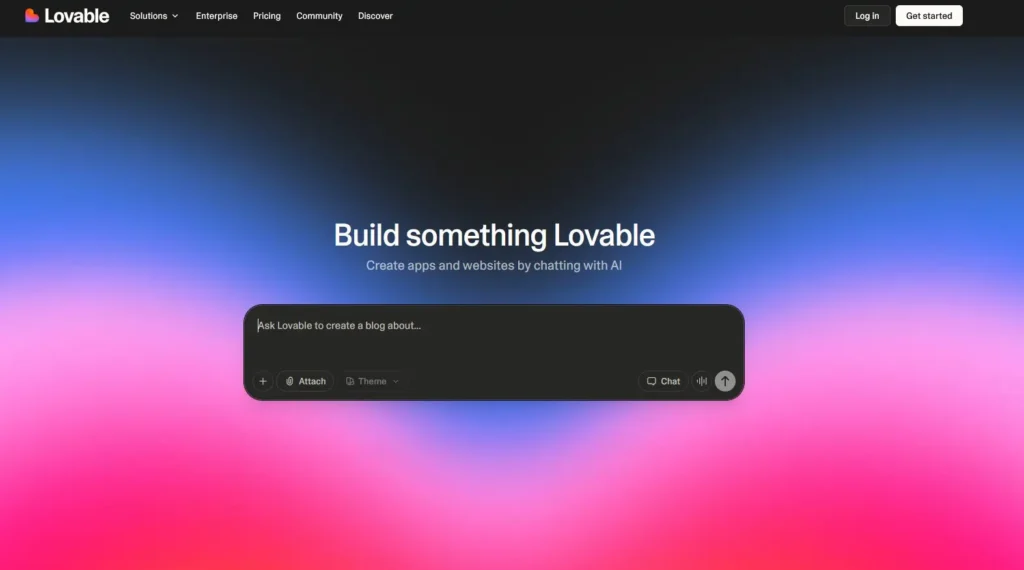
Let’s start with the basics: what is Lovable AI website builder, and what makes it different from the dozens of other website builders out there?
The Simple Explanation
Lovable AI website builder is an AI-powered platform that generates complete website layouts based on short text descriptions. You type in what you want—like “a landing page for a productivity app” or “a portfolio site for a photographer” and the AI creates a structured website with sections, design elements, and content placeholders.
Think of it like having a designer who instantly mocks up a website based on your brief, except instead of waiting days, you get results in about 30 seconds.
What Makes Lovable Different?
Most website builders (like Wix, Squarespace, Webflow) follow the same pattern:
- Choose a template
- Customize it section by section
- Add your content
- Publish
Lovable AI website builder flips this approach:
- Describe what you need in plain English
- AI generates a complete layout instantly
- Tweak only what you want to change
- Publish or export
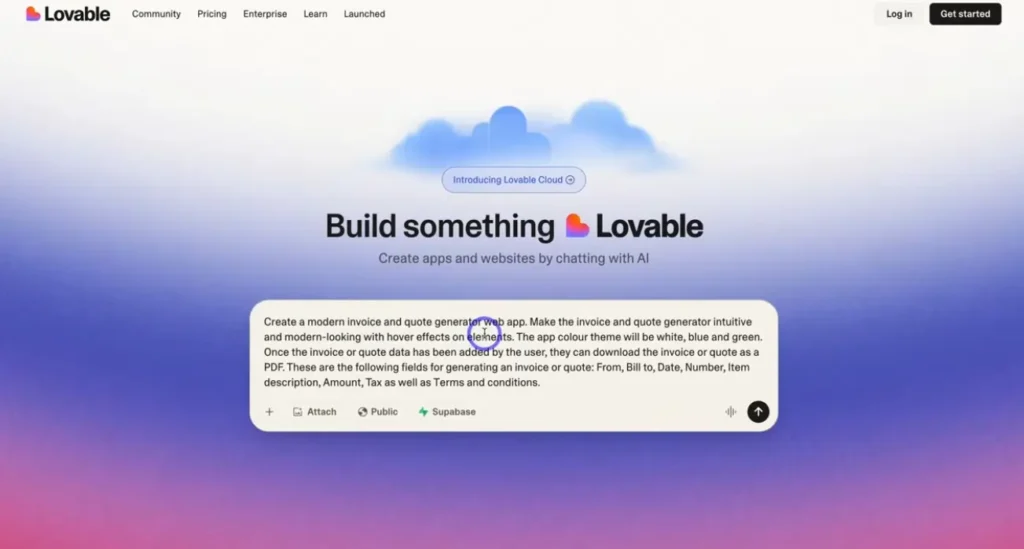
The difference? Speed and decision-making.
With traditional builders, you’re making hundreds of micro-decisions: Which template? What color scheme? How should this section be laid out? Should the CTA be above or below the fold?
Lovable AI website builder removes most of those decisions by giving you a solid starting point immediately. You’re editing and refining instead of building from scratch.
Who Created Lovable and Why?
Lovable AI website builder was built by a team frustrated with how long it takes to go from idea to live website. They noticed that most people don’t need ultra-custom designs—they just need something clean, professional, and functional that they can launch quickly.
The target user isn’t a professional developer or designer. It’s:
- Startup founders testing ideas
- Marketers launching campaigns
- Freelancers needing portfolio sites
- Small business owners who want online presence
Basically, anyone who values speed over pixel-perfect control.
How Lovable AI Website Builder Actually Works (Step-by-Step)
Let me walk you through the actual process of building a website with Lovable AI website builder, based on my real testing.
Step 1: Sign Up and Start a Project
You create an account (email or Google sign-in works), and you land on a simple dashboard. No overwhelming menus, no 47 different options. Just a text box that says:
“Describe the website you want to build”
This is where Lovable AI website builder shows its first strength: simplicity.
Step 2: Describe Your Website
I tested this with different prompts to see how well the AI understands various requests.
Test 1: Vague prompt “A website for a coffee shop”
What Lovable generated:
- Hero section with coffee imagery placeholder
- About section
- Menu section (with sample items)
- Contact section with map placeholder
- Footer with social links
Time: 28 seconds
Not bad for a super vague prompt. The structure made sense, and the layout was clean.
Test 2: Detailed prompt “A landing page for a productivity SaaS app called TaskMaster. Include a hero section with benefits, a features section with 3 key features, social proof with testimonials, pricing table with 3 tiers, and a CTA section.”
What Lovable generated:
- Exactly what I asked for, in that order
- Feature icons (generic but appropriate)
- Pricing cards with toggle for monthly/annual
- Testimonial cards with avatar placeholders
- Strong, clear CTAs throughout
Time: 35 seconds
This is where Lovable AI website builder impressed me. It actually understood structure and hierarchy from my description.
Test 3: Complex prompt “A portfolio website for a freelance UX designer. Include a project showcase with case studies, an about me section, client logos, a blog preview, and a contact form.”
What Lovable generated:
- Portfolio grid layout (nice!)
- Individual project card structure
- About section with image + bio layout
- Client logo row
- Blog preview cards
- Contact form (name, email, message fields)
Time: 42 seconds
Again, solid understanding of what a portfolio needs.
Step 3: Customize the Generated Layout
Here’s where you refine what the AI created. Lovable AI website builder gives you editing tools to:
Change content:
- Replace placeholder text with your actual copy
- Swap out images (upload your own or use stock)
- Adjust headlines and CTAs
Modify layout:
- Rearrange sections (drag and drop)
- Add or remove sections
- Change spacing and alignment
Adjust design:
- Pick color schemes
- Change fonts
- Modify button styles
- Adjust image sizing
What I liked: The editing interface is clean and intuitive. No cluttered menus. Changes happen in real-time so you see results immediately.
What I didn’t like: You can’t get super granular with design tweaks. If you want pixel-perfect control over spacing, custom animations, or complex layouts, Lovable AI website builder feels limiting.
Step 4: Preview and Publish
Once you’re happy with the site, you can:
Option 1: Publish directly Lovable AI website builder gives you a subdomain (like yoursite.lovable.app) where your site goes live instantly.
Option 2: Connect a custom domain Point your own domain to the Lovable-hosted site.
Option 3: Export the code Download the HTML/CSS/JS and host it yourself on any platform (Netlify, Vercel, your own server, etc.).
I tested the export option, and the code was clean no bloated frameworks or messy inline styles. Surprisingly good.
Real Example: Building a Landing Page in 10 Minutes
Let me show you a concrete example of what Lovable AI website builder can do.
The Challenge
I wanted to create a landing page for a fictional product: an AI email assistant called “InboxZero.”
Requirements:
- Hero with value proposition
- Three key features
- How it works (3 steps)
- Pricing (2 tiers)
- FAQ section
- Email signup form
The Process
My prompt to Lovable: “Create a landing page for InboxZero, an AI email assistant. Include: hero section with main benefit and CTA, 3 features with icons, a ‘how it works’ section with 3 numbered steps, pricing table with free and pro tiers, FAQ with 5 questions, and email signup section.”
Generated in: 38 seconds
What I got: Everything I asked for, structured logically, with clean spacing and modern design.
Customization time: 12 minutes
I:
- Replaced all placeholder text with actual copy
- Uploaded custom icons for the features
- Tweaked the color scheme to match a brand palette I created
- Adjusted pricing details
- Wrote real FAQ answers
Total time from idea to live landing page: 13 minutes, 38 seconds
Could I have done this faster with a traditional builder? Maybe, if I already had a perfect template. But the decision-making alone would’ve taken longer.
The Result
The landing page looked professional, loaded fast, and had all the sections a real SaaS landing page needs. Was it perfect? No. Would it work for validating an idea or running ads to? Absolutely.
Key Features of Lovable AI Website Builder (Detailed Breakdown)
Let’s dive deeper into what Lovable AI website builder actually offers:
1. AI-Powered Layout Generation
This is the core feature. Lovable AI website builder uses AI to understand your description and create a complete layout.
What works well:
- Understands common website types (landing pages, portfolios, blogs, business sites)
- Creates logical section order and hierarchy
- Generates appropriate content placeholders
- Chooses sensible default styling
What could be better:
- Sometimes generates too many sections (you have to delete extras)
- Can be repetitive if your prompt isn’t specific enough
- Doesn’t always nail industry-specific design patterns
Rating: 8/10 – Impressively accurate most of the time
2. Clean, Modern Design Aesthetic
Every site I generated with Lovable AI website builder had a clean, minimalist, modern look.
Design characteristics:
- Plenty of white space
- Readable typography
- Clear visual hierarchy
- Mobile-responsive by default
- Subtle animations (nothing flashy)
Who this works for: If you like the modern SaaS aesthetic (think Stripe, Linear, Notion), you’ll love Lovable’s output.
Who this doesn’t work for: If you want bold, creative, highly stylized designs, Lovable AI website builder might feel too plain.
Rating: 7/10 – Great for professional/corporate, limiting for creative
3. Fast MVP and Landing Page Creation
This is where Lovable AI website builder absolutely shines.
Use cases where it excels:
- ✅ SaaS landing pages
- ✅ Product launch pages
- ✅ Email list capture pages
- ✅ Simple portfolio sites
- ✅ Event registration pages
- ✅ Coming soon pages
I built 6 different landing pages during my testing, and every one was usable within 15 minutes.
Rating: 9/10 – Perfect for MVPs
4. Export and Hosting Options
Lovable AI website builder gives you flexibility in how you deploy:
Hosted on Lovable:
- Free subdomain (
yoursite.lovable.app) - Custom domain connection (paid plan)
- SSL included
- CDN for fast loading
Export code:
- Download clean HTML/CSS/JS
- No framework dependencies (unless you need them)
- Host anywhere you want
- Full code ownership
I exported one site and deployed it to Netlify in under 5 minutes. The code was cleaner than I expected.
Rating: 8/10 – Good flexibility
5. Built-In Components and Sections
Lovable AI website builder includes common website sections ready to use:
Available components:
- Hero sections (various styles)
- Feature grids
- Testimonial cards
- Pricing tables
- FAQ accordions
- Contact forms
- Image galleries
- Blog post previews
- Team member cards
- Logo clouds (for clients/partners)
- CTAs (buttons, forms, etc.)
You can mix and match these as needed.
Rating: 7/10 – Covers basics well, but not exhaustive
Lovable AI Website Builder Pricing (Detailed Breakdown)
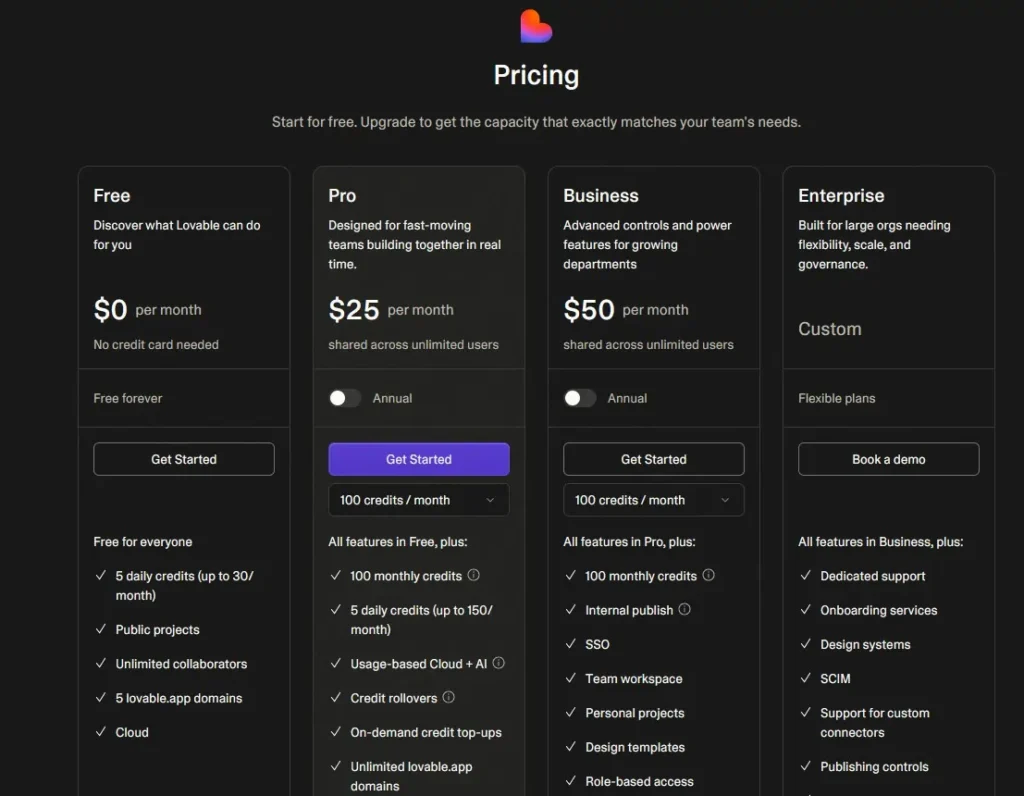
Let’s talk money. How much does Lovable AI website builder actually cost?
Free Plan
What you get:
- Unlimited website generation (!)
- Lovable subdomain hosting
- Basic customization
- Export code option
- Mobile responsive designs
Limitations:
- Lovable branding on site
- No custom domain
- Limited support
Who it’s for: Testing Lovable AI website builder, building MVPs, personal projects
My take: The free plan is generous. You can actually build and launch real sites without paying.
Pro Plan ($19/month)
What you get:
- Everything in Free
- Custom domain connection
- Remove Lovable branding
- Priority support
- Advanced customization options
- More export flexibility
Who it’s for: Freelancers, small businesses, anyone launching client work or commercial projects
My take: Fair pricing compared to competitors. Cheaper than Webflow ($23/month), similar to Carrd ($19/year but way more limited).
Team Plan ($49/month)
What you get:
- Everything in Pro
- Collaboration features
- Team member management
- Brand kits and templates
- Priority generation queue
Who it’s for: Agencies, marketing teams, companies building multiple sites
My take: Makes sense if you’re building 5+ sites per month or working with a team.
Comparison to Competitors
| Feature | Lovable | Webflow | Wix | Framer |
|---|---|---|---|---|
| Starting Price | Free | $14/mo | Free | Free |
| AI Generation | ✅ Yes | ❌ No | ⚠️ Limited | ⚠️ Limited |
| Code Export | ✅ Yes | ✅ Yes (paid) | ❌ No | ✅ Yes |
| Learning Curve | Easy | Hard | Medium | Medium |
| Custom Domain | $19/mo | $14/mo | $16/mo | $5/mo |
Lovable AI website builder is competitively priced, especially considering the AI generation feature.
Who Should Use Lovable AI Website Builder?
After extensive testing, here’s who I think Lovable AI website builder is perfect for:
✅ Startup Founders Testing Ideas
If you’re validating a business idea and need a landing page up TODAY, Lovable AI website builder is perfect.
Why it works:
- You can test multiple ideas with different landing pages
- No design skills needed
- Fast enough to launch, get feedback, iterate
- Cheap enough that the cost doesn’t matter
Example: Build a landing page for your SaaS idea, run Google Ads to it, see if people sign up. Pivot if they don’t. All within a week.
✅ Marketers Launching Campaigns
Marketing teams need landing pages constantly—product launches, lead magnets, event registrations, etc.
Why Lovable works:
- Build campaign pages in minutes, not days
- No dev team dependency
- A/B test different variations easily
- Export and integrate with marketing stack
Example: Your company is sponsoring a conference. You need a registration page in 2 days. Lovable AI website builder gets it done in an afternoon.
✅ Freelancers and Consultants
If you’re a freelancer who needs a portfolio site but doesn’t want to spend a week building it, Lovable AI website builder saves you time.
Why it works:
- Professional-looking results fast
- Focus on your content, not design
- Easy to update when you get new clients/projects
Example: You’re a copywriter who needs a portfolio site to send to potential clients. Lovable builds it in 20 minutes.
✅ Non-Technical Business Owners
Small business owners who need a web presence but find traditional builders overwhelming.
Why Lovable works:
- No technical knowledge required
- Simple, guided process
- Clean, professional results
- Affordable
Example: You run a local bakery and need a simple site with hours, menu, and contact info. Lovable AI website builder handles it.
Who Should NOT Use Lovable AI Website Builder?
Lovable AI website builder isn’t for everyone. Here’s who should look elsewhere:
❌ Designers Who Want Pixel-Perfect Control
If you’re a designer who needs precise control over every pixel, Lovable AI website builder will frustrate you.
Why it doesn’t work:
- Limited granular control
- Can’t adjust spacing in 1px increments
- No advanced animation tools
- Design system is opinionated
Better alternatives: Webflow, Figma + code export
❌ Developers Building Complex Apps
If you’re building a web app with complex functionality, auth, databases, etc., Lovable AI website builder isn’t built for that.
Why it doesn’t work:
- No backend functionality
- No database integration
- No auth system
- Focused on static/simple sites
Better alternatives: Next.js, React, full-stack frameworks
❌ E-commerce Stores
If you need a full online store with inventory, checkout, shipping, etc., Lovable AI website builder doesn’t have e-commerce features.
Why it doesn’t work:
- No product catalog
- No shopping cart
- No payment processing
- Not built for e-commerce
Better alternatives: Shopify, WooCommerce, BigCommerce
❌ Anyone Needing Highly Custom Designs
If your brand requires a unique, highly stylized website (think luxury brands, creative agencies, art portfolios), Lovable’s templates might feel too generic.
Why it doesn’t work:
- Design aesthetic is standardized
- Hard to achieve truly unique looks
- Limited creative flexibility
Better alternatives: Custom development, Webflow with custom design
Lovable AI Website Builder vs. Traditional Builders (Detailed Comparison)
Let’s compare Lovable AI website builder to traditional options in different scenarios:
Scenario 1: Building a Landing Page
Traditional Builder (Wix/Squarespace):
- Choose from 100+ templates: 15 minutes
- Customize template: 60-90 minutes
- Add content: 30 minutes
- Total: ~2-2.5 hours
Lovable AI Website Builder:
- Describe what you need: 2 minutes
- AI generates layout: 30 seconds
- Customize: 20 minutes
- Add content: 15 minutes
- Total: ~40 minutes
Winner: Lovable (3x faster)
Scenario 2: Building a Multi-Page Business Site
Traditional Builder:
- More flexibility for complex navigation
- Easier to create custom page layouts
- Better for large content sites
- Time: 4-8 hours
Lovable AI Website Builder:
- Can generate multiple pages
- Navigation is more basic
- Better for simpler site structures
- Time: 2-3 hours
Winner: Depends on complexity. Lovable for simple multi-page, traditional for complex.
Scenario 3: Ongoing Maintenance
Traditional Builder:
- Easier to make small edits
- Better CMS for regular content updates
- More third-party integrations
Lovable AI Website Builder:
- Quick to regenerate entire sections
- Less built-in CMS functionality
- Code export means you can move to another platform later
Winner: Traditional builders (for now)
Is Lovable AI Website Builder Actually Good for SEO?
This is a common question, so let’s address it directly.
What Lovable Does Well for SEO:
✅ Clean code structure The exported HTML is semantic and well-structured. Search engines can crawl it easily.
✅ Mobile-responsive by default All Lovable AI website builder sites work on mobile, which is critical for SEO.
✅ Fast loading times The code is lightweight. Sites load quickly, which Google rewards.
✅ Proper heading hierarchy AI generates H1, H2, H3 tags correctly most of the time.
What You Still Need to Do Yourself:
❌ Write SEO-optimized content The AI generates placeholder text. You need to replace it with keyword-rich, valuable content.
❌ Customize meta titles and descriptions Lovable AI website builder doesn’t auto-generate these. You must add them manually.
❌ Add alt text to images Image optimization is on you.
❌ Build backlinks No tool can do this for you. You need a separate SEO strategy.
❌ Set up analytics and tracking You’ll need to manually add Google Analytics, Search Console, etc.
My SEO Verdict:
Lovable AI website builder gives you a solid SEO foundation (clean code, fast loading, mobile-friendly). But SEO success depends on what YOU do with the content.
Rating: 7/10 – Good foundation, but you need SEO knowledge to maximize results
Pros and Cons of Lovable AI Website Builder (Honest Assessment)
Let me summarize the real pros and cons based on my testing:
Pros:
✅ Incredibly fast generation From idea to functional website in under a minute. No other builder I’ve tested comes close.
✅ Beginner-friendly If you can describe what you want, you can use Lovable AI website builder. No learning curve.
✅ Clean, professional designs Modern aesthetic that works for most business use cases.
✅ Perfect for MVPs and landing pages This is Lovable’s sweet spot. If you need to launch fast, it’s unbeatable.
✅ Code export option You’re not locked in. Export and move to any hosting platform.
✅ Generous free plan You can actually build real projects without paying.
✅ Good value for money $19/month is reasonable compared to competitors.
Cons:
❌ Limited design customization If you want deep control over design, Lovable AI website builder feels restrictive.
❌ Not built for complex sites Large, multi-functional websites aren’t Lovable’s strength.
❌ Generic aesthetic Everything looks clean and modern, but also somewhat similar. Hard to achieve a truly unique look.
❌ No e-commerce features Can’t build online stores.
❌ No built-in CMS Managing lots of content (like a blog with 100+ posts) is harder than dedicated CMS platforms.
❌ Occasional AI misunderstandings Sometimes the AI generates sections you didn’t ask for or misinterprets your prompt.
Common Questions About Lovable AI Website Builder (FAQ)
Q: Can I actually build a professional website with Lovable?
A: Yes, for certain types of sites. I’ve built landing pages, portfolio sites, and simple business sites that look professional and function well.
But “professional” depends on your standards. If you need a highly custom, award-winning design, Lovable AI website builder won’t get you there. If you need clean, modern, and functional, it will.
Q: Do I need coding skills to use Lovable?
A: No. The entire point of Lovable AI website builder is that non-technical people can build sites.
That said, if you DO know code, you have more options (like exporting and customizing further).
Q: Can I use Lovable for client work?
A: Yes, on the Pro plan ($19/month). You can remove Lovable branding and connect custom domains.
I know freelancers using Lovable AI website builder to quickly build client landing pages and charge $500-2,000 per project. The speed advantage means they can take on more clients.
Q: How does Lovable compare to ChatGPT for building websites?
A: ChatGPT can write HTML/CSS code if you prompt it, but you still have to assemble everything yourself.
Lovable AI website builder is purpose-built for website generation. It understands structure, design, and deployment in ways ChatGPT doesn’t. It’s faster and easier for actual website building.
Q: Can I migrate my Lovable site to another platform later?
A: Yes. Export the code and host it anywhere (Netlify, Vercel, GitHub Pages, your own server, etc.).
Or, if you want to move to WordPress, Webflow, etc., you’ll need to rebuild (but you can use your Lovable site as a design reference).
Q: Does Lovable work for blogs?
A: Kind of. You can generate a blog layout, but Lovable AI website builder doesn’t have a robust content management system.
For serious blogging (50+ posts), WordPress or Ghost is better. For a simple blog section on a business site, Lovable works fine.
Q: Is my content secure on Lovable?
A: According to their privacy policy, your data is encrypted and not shared with third parties.
If you’re paranoid, export your code and host it yourself for full control.
Q: Can I sell websites built with Lovable?
A: Yes. There are no restrictions on commercial use. You own what you build.
Alternatives to Lovable AI Website Builder
If Lovable AI website builder doesn’t fit your needs, here are solid alternatives:
1. Webflow
- Best for: Designers who want pixel-perfect control
- Pros: Incredibly powerful, professional results, great CMS
- Cons: Steep learning curve, more expensive
- Price: $14-$39/month
2. Framer
- Best for: Interactive, animated websites
- Pros: Beautiful animations, designer-friendly, AI assist features
- Cons: Learning curve, limited e-commerce
- Price: $5-$15/month
3. Carrd
- Best for: Super simple one-page sites
- Pros: Dead simple, dirt cheap, fast
- Cons: Very limited (one-page only), no AI generation
- Price: $9-$49/year
4. Wix ADI (AI)
- Best for: Complete beginners who want hand-holding
- Pros: Wizard-style setup, lots of templates, all-in-one platform
- Cons: Less control, proprietary platform, can’t export code
- Price: $16-$45/month
5. 10Web (AI WordPress)
- Best for: WordPress users who want AI assistance
- Pros: WordPress ecosystem, SEO-friendly, AI builder + traditional control
- Cons: WordPress learning curve, more technical
- Price: $10-$60/month
My recommendation: Try Lovable AI website builder’s free plan. If it works for your use case, stick with it. If you need more power, try Webflow or Framer.
My Final Verdict on Lovable AI Website Builder
After two weeks of testing Lovable AI website builder with different projects, here’s my honest conclusion:
What Lovable AI website builder does exceptionally well:
It solves one specific problem brilliantly: getting from idea to live website as fast as possible without sacrificing quality.
If your goal is to launch a landing page, test a business idea, create a portfolio, or build an MVP, Lovable AI website builder is one of the best tools available in 2026. The speed is genuinely impressive.
Where Lovable AI website builder falls short:
It’s not trying to be a full website platform for complex sites. If you need deep customization, e-commerce, advanced features, or a unique creative design, Lovable will feel limiting.
Who I recommend Lovable AI website builder for:
✅ Startup founders validating ideas
✅ Marketers launching campaigns
✅ Freelancers needing quick client sites
✅ Small business owners wanting web presence ✅ Anyone who values speed over perfection
Who should skip Lovable AI website builder:
❌ Designers wanting full creative control
❌ Developers building complex web apps
❌ E-commerce store owners
❌ Brands needing highly custom designs
Is it worth trying?
Absolutely. The free plan lets you test it risk-free. Build a site, see if it meets your needs. If it does, you’ve found a powerful tool. If not, you’ve lost 20 minutes.
For me, Lovable AI website builder has earned a permanent spot in my toolkit. It’s not the ONLY website builder I use, but for specific use cases—especially MVPs and landing pages—it’s become my go-to.
Final Rating: 8/10
Lovable AI website builder excels at what it’s designed to do. Just make sure what you need matches what it offers.
If you want to try Lovable AI website builder yourself, head to their website and start with the free plan. Build something real and see if it clicks with your workflow.
And if you end up using Lovable AI website builder for a project, I’d love to hear how it goes. The tool is still evolving, and it’ll be interesting to see how it grows over the next year.
Comments are closed.

[…] Lovable – AI-First Website […]