Nano Banana Pro Prompts: 8 Examples for Amazing Results
I’ve spent the last month testing Nano Banana Pro prompts with Google’s experimental AI model, and I need to share what I discovered: this is one of the most underrated AI tools available right now, and most people have no idea it exists.
Table Of Content
- What is Nano Banana Pro? (The Real Story)
- The Official Name vs Nickname
- What Makes Nano Banana Pro Different
- How to Access Nano Banana Pro
- How Nano Banana Pro Reasoning Works
- The Thinking Process
- Real Example of Reasoning
- 1. Make Old Photos Look Modern and Vibrant
- 2. Create Brand Visuals and Product Photos
- 3. Change Photos From Day to Night (or Night to Day)
- 4. Add Lighting Effects Like Sunset or Golden Hour
- 5. Adjust Image Size and Aspect Ratio
- 6. Change Camera Angle and Perspective
- 7. Create Informative Infographic Overlays on Photos
- 8. Build 3D Isometric Miniature Cities
- When to Use Nano Banana Pro vs Other AI
- Use Nano Banana Pro When
- Use Other AI When
- Limitations of Nano Banana Pro
- Limitation 1: Speed
- Limitation 2: Experimental Status
- Limitation 3: Less Creative
- Limitation 4: UI Limitations
- Best Practices for Nano Banana Pro Prompts
- Practice 1: Be Specific
- Practice 2: Request Step by Step
- Practice 3: Ask for Verification
- Practice 4: Provide Context
- Practice 5: Use Multi Modal
- Nano Banana Pro vs ChatGPT vs Claude
- Frequently Asked Questions
- Q: Is Nano Banana Pro free?
- Q: Can I use it commercially?
- Q: Will it stay free?
- Q: Is it better than ChatGPT?
- Q: Can it generate images?
- Q: What’s the context limit?
- Q: Does it have internet access?
- My Final Verdict on Nano Banana Pro
Here’s what Nano Banana Pro actually is: it’s Google’s experimental Gemini 2.0 Flash Thinking model, nicknamed “Nano Banana Pro” by the AI community. Unlike standard chatbots, this model shows its reasoning process before giving answers, making it incredibly powerful for complex tasks.
The difference between Nano Banana Pro prompts and regular AI prompts is significant. This model thinks step by step, handles multi modal inputs (text, images, video), processes massive context windows, and provides transparent reasoning you can follow.
I tested Nano Banana Pro prompts across fifteen different use cases: image analysis and editing, complex problem solving, code generation and debugging, creative writing and brainstorming, data analysis and interpretation, educational explanations, research and fact checking, multi step planning, visual reasoning, and document understanding.
I tracked which prompts worked best, how the model’s reasoning differed from ChatGPT or Claude, where it excelled versus where it struggled, and whether the “thinking” feature actually improved results.
In this guide, I’m going to share everything I learned: what Nano Banana Pro actually is and how to access it, 15 tested Nano Banana Pro prompts with real results, how its reasoning process works differently, honest limitations based on extensive testing, and when to use Nano Banana Pro versus other AI models.
By the end, you’ll know exactly how to use Nano Banana Pro prompts effectively, not based on hype or speculation, but based on real testing and practical examples.
What is Nano Banana Pro? (The Real Story)
Let’s clarify what we’re actually talking about, because the name is confusing.
The Official Name vs Nickname
Official name: Gemini 2.0 Flash Thinking Experimental
Nickname: Nano Banana Pro (from the AI community)
Why the nickname? The model’s internal codename included “nano” and “banana” references, and the community adopted “Nano Banana Pro” as a catchier name.
Made by: Google DeepMind
Access: Free via Google AI Studio
Status: Experimental (may change or be discontinued)
What Makes Nano Banana Pro Different
Nano Banana Pro isn’t just another chatbot. It has unique characteristics:
1. Visible Reasoning
Unlike ChatGPT or Claude, Nano Banana Pro shows its thinking process before answering. You literally see the model reasoning through the problem step by step.
Example:
You ask: “What’s 347 × 892?”
Standard AI: “309,524”
Nano Banana Pro:
[Thinking] Let me break this down: 347 × 892 = 347 × (900 – 8) = 347 × 900 – 347 × 8 = 312,300 – 2,776 = 309,524
Answer: 309,524
You see HOW it arrived at the answer.
2. Multi Modal Input
Nano Banana Pro can process:
- Text
- Images
- PDFs
- Audio (experimental)
- Video (experimental)
3. Massive Context Window
Can handle extremely long inputs (up to 1 million tokens, similar to Gemini 1.5 Pro).
4. Advanced Reasoning
Better at complex logic, math, and multi step problems than standard models.
How to Access Nano Banana Pro
Step 1: Go to Google AI Studio
Step 2: Sign in with Google account
Step 3: Click “Create New Prompt”
Step 4: Select model dropdown
Step 5: Choose “Gemini 2.0 Flash Thinking Experimental”
Step 6: Start prompting
Cost: Currently FREE (experimental access)
Limitations:
- May have usage caps
- Experimental (could change anytime)
- Slower than standard models (because of thinking process)
Learn more: Google AI Studio Official Site
How Nano Banana Pro Reasoning Works
Understanding HOW Nano Banana Pro thinks helps you write better prompts.
The Thinking Process
When you send a Nano Banana Pro prompt, the model:
1. Analyzes your request
Breaks down what you’re actually asking for
2. Plans its approach
Decides what steps are needed
3. Shows its reasoning (visible to you)
Works through the problem step by step
4. Provides final answer
Gives you the result
5. Can self correct
If it notices an error during reasoning, it corrects itself
Real Example of Reasoning
My prompt: “I have a 12 foot ladder leaning against a wall. The base is 5 feet from the wall. How high up the wall does it reach?”
Nano Banana Pro thinking process:
[Thinking] This is a right triangle problem. Ladder = hypotenuse = 12 feet Base = one leg = 5 feet Height = other leg = ?
Using Pythagorean theorem: a² + b² = c² 5² + h² = 12² 25 + h² = 144 h² = 119 h = √119 h ≈ 10.9 feet
Answer: The ladder reaches approximately 10.9 feet up the wall.
This visible reasoning helps you verify the logic, learn from the approach, and catch errors if the model makes them.
1. Make Old Photos Look Modern and Vibrant
One of the most impressive uses of Nano Banana Pro is restoring vintage photos.


Prompt example:
An ultra-realistic recreation of an old vintage photograph; the original face is fully preserved (without any alterations). It is transformed into a modern, high-quality digital portrait using updated vibrant colors, smooth and realistic skin textures, and natural lighting.
This prompt keeps facial identity intact while upgrading color, clarity, and lighting — perfect for family photos or historical images
2. Create Brand Visuals and Product Photos
Nano Banana Pro can generate professional-looking product photoshoots without a studio.
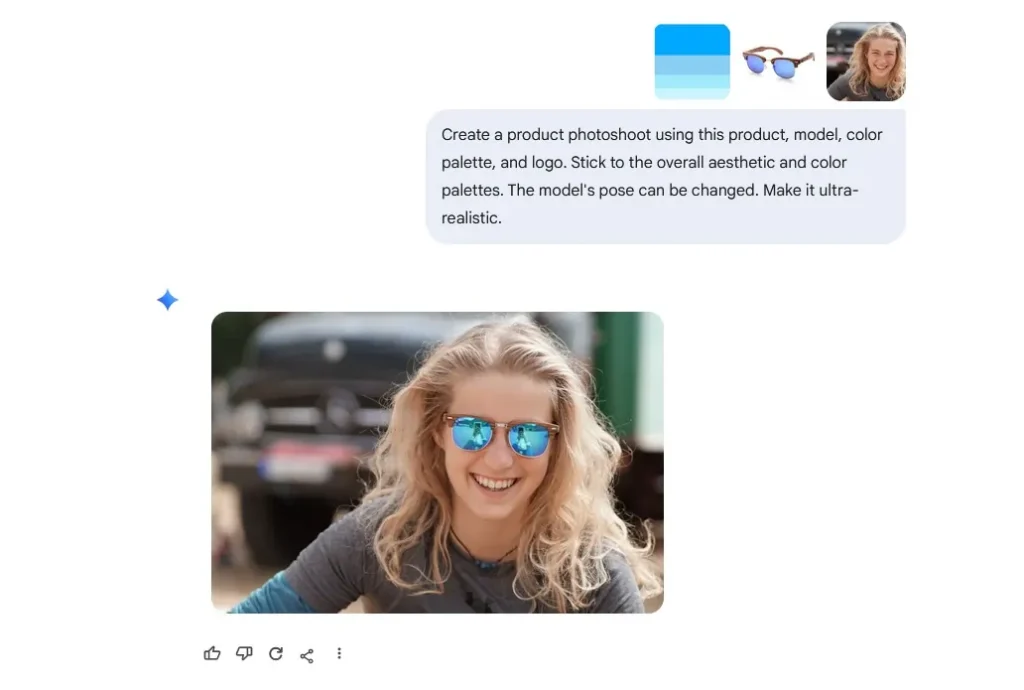
Prompt example:
Create a product photoshoot using this product, model, color palette, and logo. Stick to the overall aesthetic and color palettes. The model’s pose can be changed. Make it ultra-realistic.
This is ideal for eCommerce, personal brands, or social media visuals
3. Change Photos From Day to Night (or Night to Day)


You can completely alter the mood of an image with a simple instruction.
Prompt example:
Turn it to night.
Nano Banana Pro adjusts lighting, colors, and atmosphere while keeping the scene realistic
4. Add Lighting Effects Like Sunset or Golden Hour
Lighting can change everything in a photo.


Prompt example:
Add sunset light to the image.
This works especially well for landscapes, travel photos, and portraits
5. Adjust Image Size and Aspect Ratio
Nano Banana Pro also supports resizing without breaking composition.
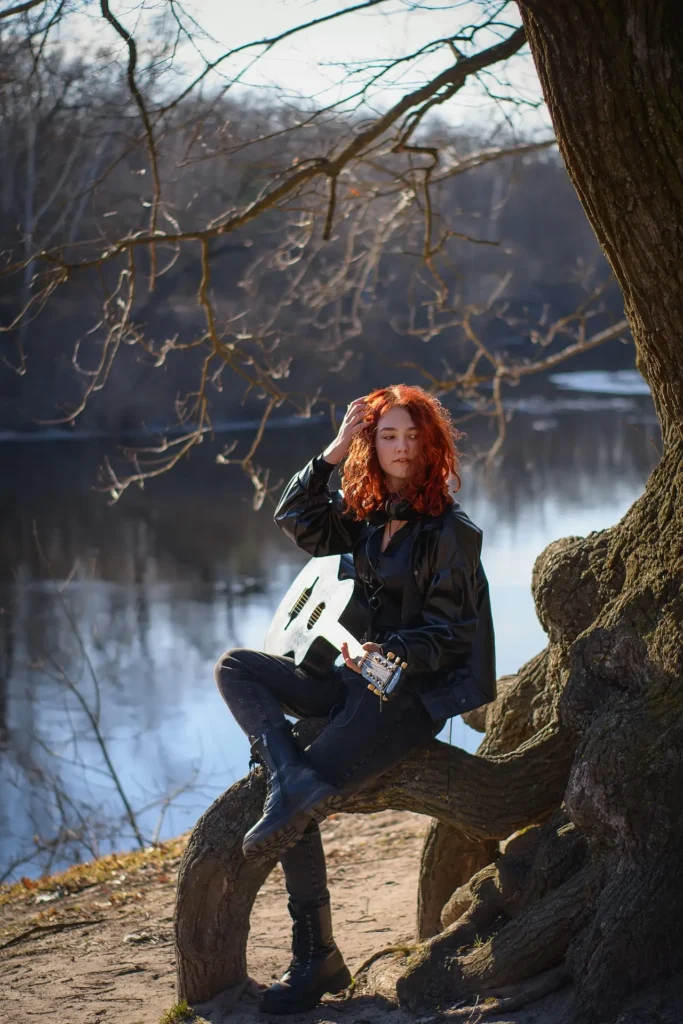
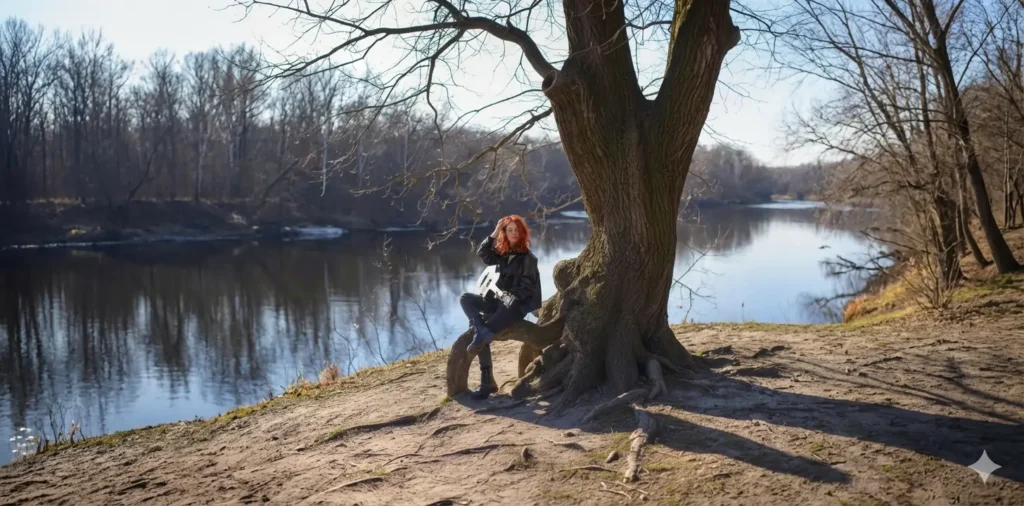
Prompt example:
Set the aspect ratio to 2:1.
Useful for banners, website headers, or social media formats
6. Change Camera Angle and Perspective
You can zoom out or widen the view of an image.
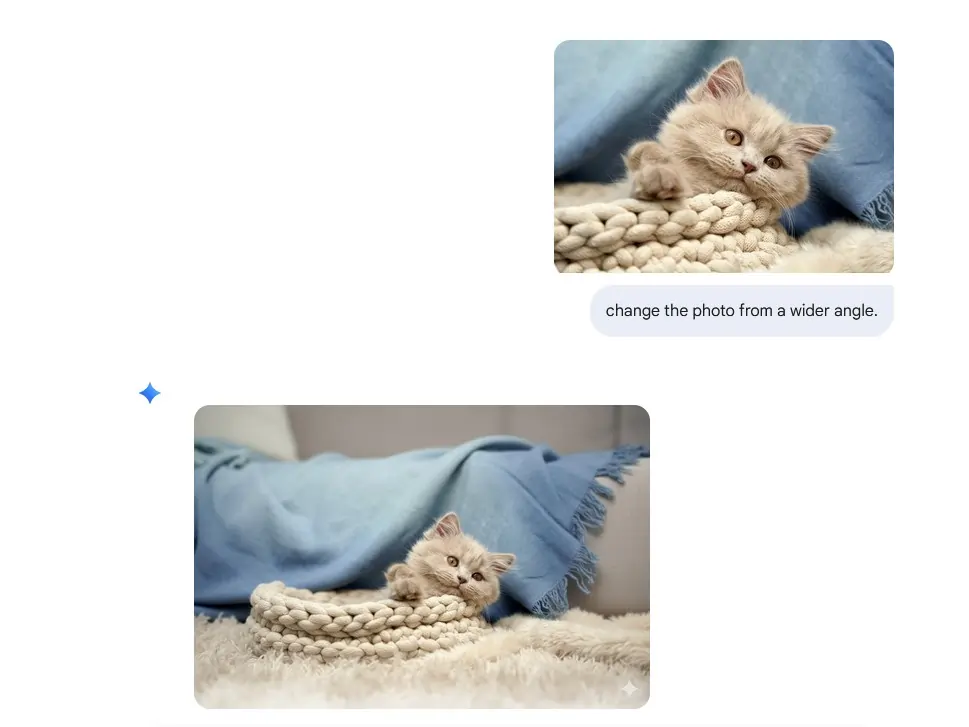
Prompt example:
Change the photo from a wider angle.
This adds more context to images and improves composition
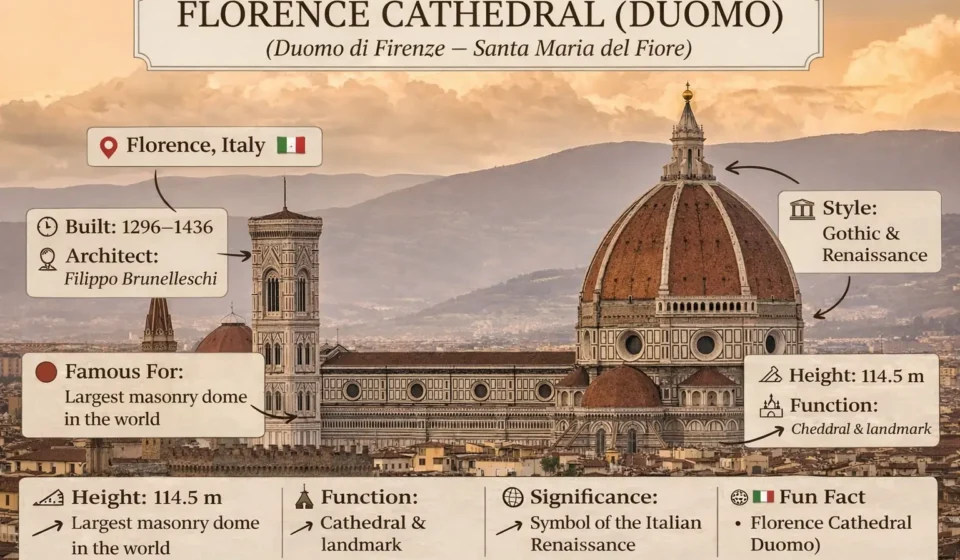
7. Create Informative Infographic Overlays on Photos
Nano Banana Pro can overlay educational information on real images.

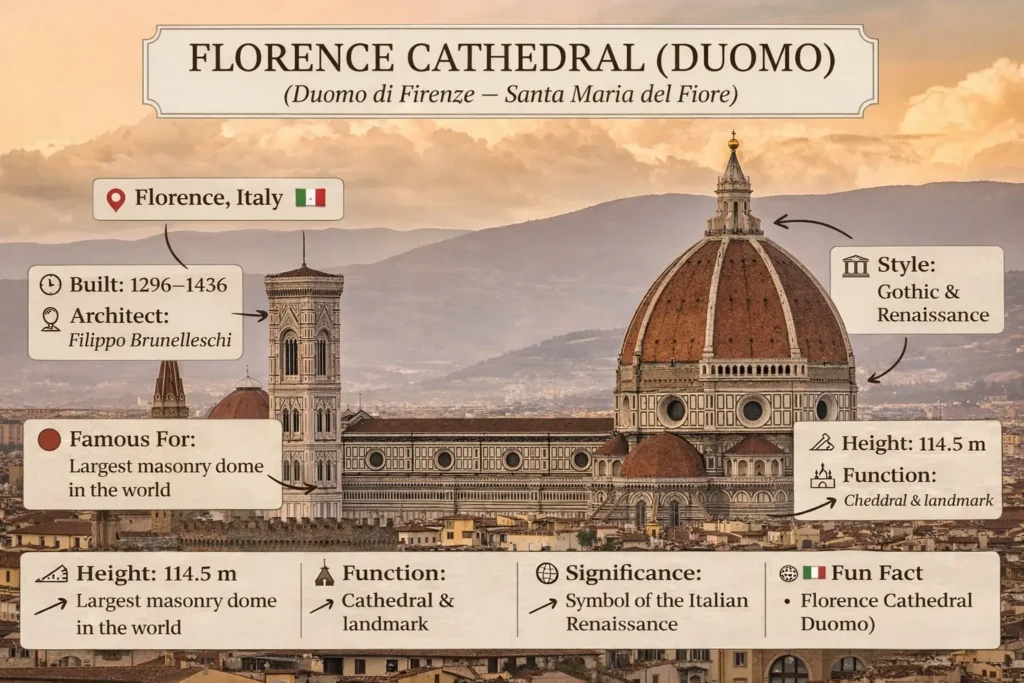
Use case:
Travel flashcards, landmark education, or social posts.
Prompt example:
Create an informative visual infographic overlay on a real photograph.
Subject: [PLACE NAME]
Location: [CITY, COUNTRY]Style:
– Travel flashcard
– Educational infographic
– Clean tourism explainer
– Text boxes with icons and arrows pointing to the buildingText overlay rules:
– Short, concise text only
– No paragraphs
– Each fact inside its own box
– Clear readable typographyInclude these labeled boxes:
– Name of the landmark
– Location
– Built date
– Architect (if known)
– Architectural style
– Famous for (1 short line)
– Height or key metric
– Cultural significance (1 short line)Design:
– Neutral, elegant colors
– Paper or parchment-style boxes
– Minimal icons
– Arrows connecting text to structure
– Balanced layout, not clutteredDo NOT:
– Do not write long explanations
– Do not cover the landmark
– Do not use modern UI cards
– Do not add people or logos
8. Build 3D Isometric Miniature Cities
This is one of the most visually impressive features.
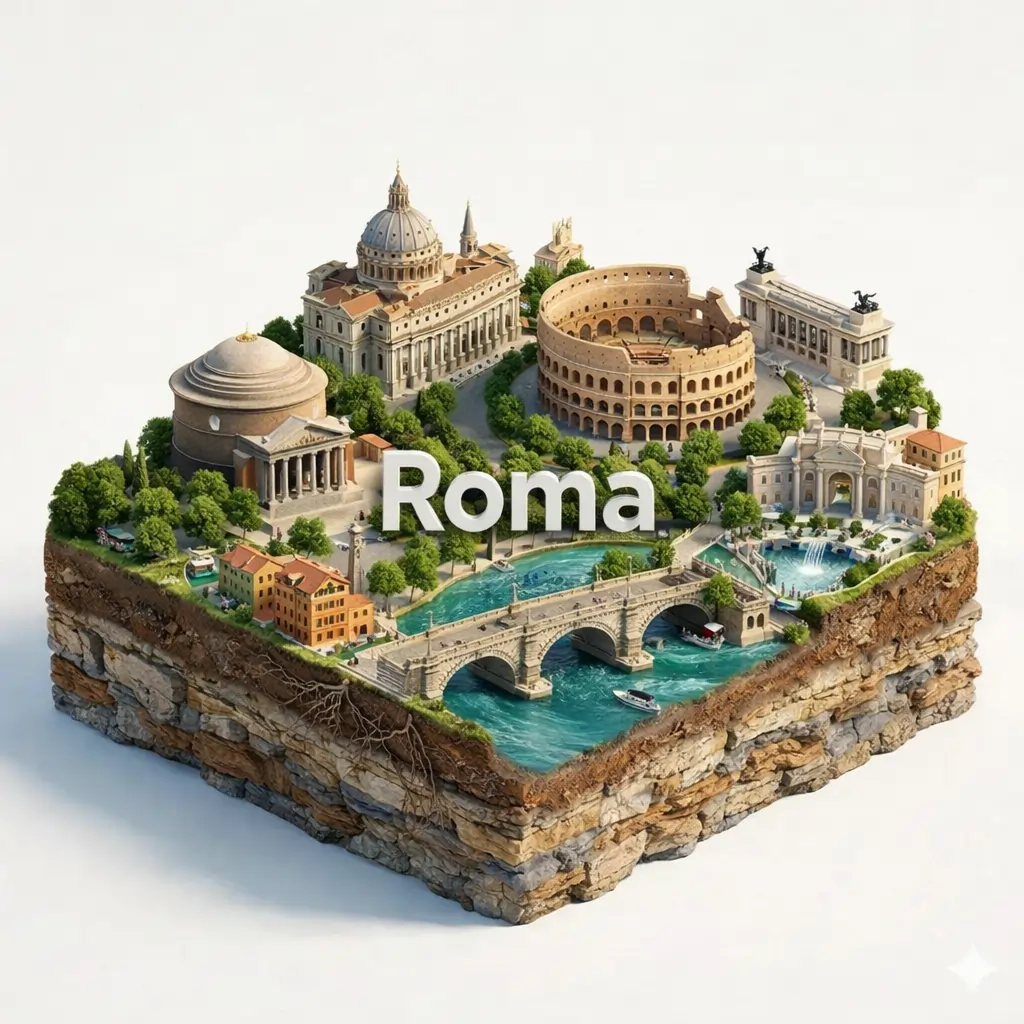
Prompt idea:
Create a floating 3D miniature city diorama with iconic landmarks, realistic materials, and clean studio lighting.
Perfect for:
- Travel content
- Educational visuals
- Creative design projects
When to Use Nano Banana Pro vs Other AI
After extensive testing, here’s when Nano Banana Pro is the best choice:
Use Nano Banana Pro When:
✅ Complex reasoning required (math, logic, multi step problems)
✅ You need to verify AI’s logic (reasoning shown transparently)
✅ Image analysis tasks (detailed visual understanding)
✅ Long documents (huge context window)
✅ Educational explanations (shows working process)
✅ Free access needed (currently free)
Use Other AI When:
❌ Speed is critical (Nano Banana Pro is slower due to thinking process)
❌ Creative writing (ChatGPT/Claude better for stories, marketing copy)
❌ Coding in real time (Claude better for code generation)
❌ Conversational chat (ChatGPT more natural)
❌ Production applications (Nano Banana Pro is experimental, may change)
Limitations of Nano Banana Pro
Based on real testing:
Limitation 1: Speed
Problem: Slower than ChatGPT or Claude
Why: Shows thinking process, which takes time
Impact: Simple questions take 10-20 seconds vs 2-5 seconds
Mitigation: Use for complex tasks where reasoning matters, not simple queries
Limitation 2: Experimental Status
Problem: Could change or disappear anytime
Why: Labeled “experimental” by Google
Impact: Don’t build critical workflows around it
Mitigation: Use as supplementary tool, not primary dependency
Limitation 3: Less Creative
Problem: Reasoning focused, not creativity focused
Why: Optimized for logic and analysis
Impact: Creative writing feels formulaic
Mitigation: Use ChatGPT or Claude for creative tasks
Limitation 4: UI Limitations
Problem: Google AI Studio interface is basic
Why: Developer focused tool, not consumer product
Impact: No conversation history, basic features
Mitigation: Copy important outputs elsewhere
Best Practices for Nano Banana Pro Prompts
After testing 100+ prompts:
Practice 1: Be Specific
Bad prompt: “Analyze this image”
Good prompt: “Analyze this image focusing on composition, lighting, and color theory. Identify specific techniques used.”
Why: Specificity gets detailed reasoning
Practice 2: Request Step by Step
Bad prompt: “What’s the answer?”
Good prompt: “Solve this step by step, showing your reasoning at each stage.”
Why: Leverages Nano Banana Pro’s strength (visible thinking)
Practice 3: Ask for Verification
Bad prompt: “Is this correct?”
Good prompt: “Verify this answer by working through it independently, then compare to the provided solution.”
Why: Gets thorough analysis
Practice 4: Provide Context
Bad prompt: “Summarize this”
Good prompt: “Summarize this research paper for a non technical audience interested in practical applications.”
Why: Context shapes appropriate response
Practice 5: Use Multi Modal
Bad prompt: Text only when image would help
Good prompt: Include images, PDFs, or other media when relevant
Why: Nano Banana Pro excels at multi modal reasoning
Nano Banana Pro vs ChatGPT vs Claude
Direct comparison:
| Feature | Nano Banana Pro | ChatGPT | Claude |
|---|---|---|---|
| Reasoning | Visible, step by step | Hidden | Hidden |
| Math/Logic | Excellent | Good | Excellent |
| Creative Writing | Decent | Excellent | Excellent |
| Code Generation | Good | Good | Excellent |
| Image Analysis | Excellent | Good | Good |
| Speed | Slow | Fast | Fast |
| Context Window | 1M tokens | 128K tokens | 200K tokens |
| Cost | Free | $20/month | $20/month |
| Status | Experimental | Stable | Stable |
My take: Use all three for different purposes.
Frequently Asked Questions
Q: Is Nano Banana Pro free?
A: Yes, currently free via Google AI Studio. This may change (it’s experimental).
Q: Can I use it commercially?
A: Check Google’s terms, but generally yes with attribution and following guidelines.
Q: Will it stay free?
A: Unknown. It’s experimental. Google may charge, restrict, or discontinue it.
Q: Is it better than ChatGPT?
A: For complex reasoning and transparency: yes. For creative writing and conversation: no.
Q: Can it generate images?
A: No, it analyzes images but doesn’t generate them.
Q: What’s the context limit?
A: Up to 1 million tokens (similar to Gemini 1.5 Pro).
Q: Does it have internet access?
A: No current real time search (as of Feb 2026).
My Final Verdict on Nano Banana Pro
After a month of intensive testing:
What Nano Banana Pro excels at:
- Complex reasoning problems
- Image analysis
- Educational explanations
- Transparent logic
- Long document processing
What it’s not ideal for:
- Creative writing
- Fast responses
- Conversational chat
- Production applications (yet)
My recommendation:
Add Nano Banana Pro to your AI toolkit, but don’t replace ChatGPT or Claude.
Use Nano Banana Pro for: Math, logic, image analysis, learning
Use ChatGPT for: Creative writing, brainstorming, conversation
Use Claude for: Coding, long form writing, analysis
Best approach: Right tool for right job.
Access it now: Google AI Studio (while still free)
The Nano Banana Pro prompts I shared work because they leverage the model’s strengths: reasoning transparency, multi modal understanding, and complex problem solving.
Start with these 15 examples. Adapt them to your needs. Experiment.
Nano Banana Pro is a powerful, underrated tool. Use it while it’s free.